Ignore the template counts and the AI buzzwords. A formatting app earns its money on a short list of unglamorous abilities, and the first one is knowing which aspect ratios your platforms actually use.
Pick by ratios, not by marketing
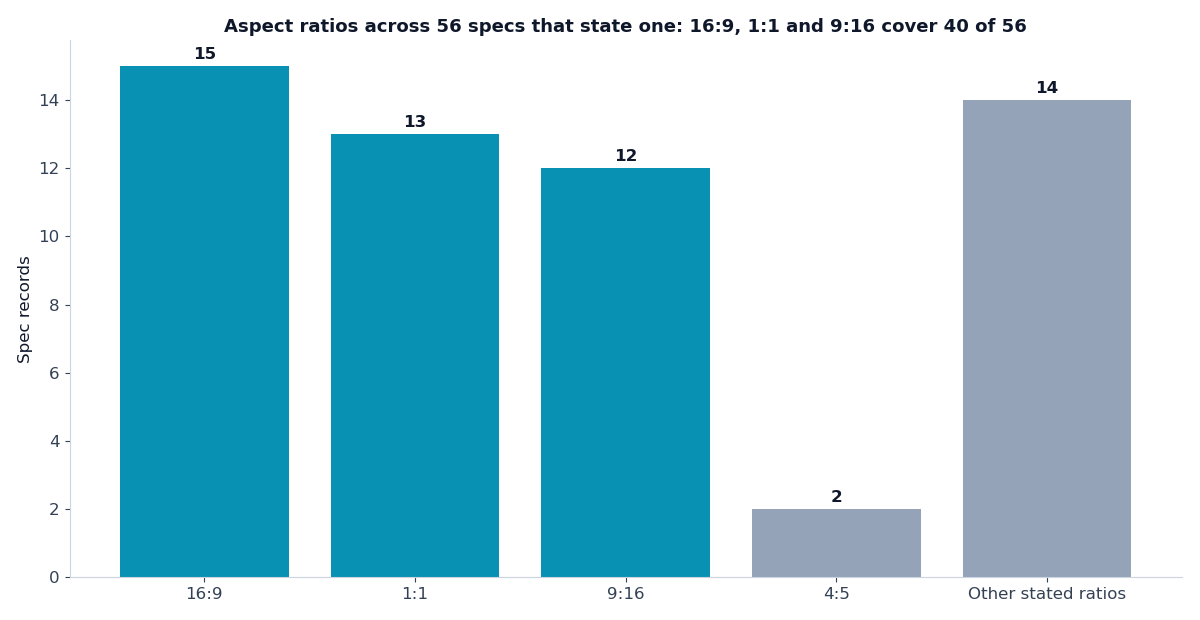
Of the 74 spec records in our database, 56 state an aspect ratio. Three ratios do almost all the work: 16:9 appears 15 times, 1:1 appears 13 times, and 9:16 appears 12 times. Together they cover 40 of the 56. The portrait 4:5 shows up only twice, and the remaining 14 records are scattered across one-off ratios like 1.91:1, 2:3 and wide banner shapes. So the test for any app is simple: does it handle tall, square and wide perfectly, with safe zones, before it brags about anything else? An app that fumbles 9:16 text placement fails the most-used ratio on the fastest-growing formats.
The six checks that matter
- Does it know current specs? Platforms change dimensions without notice. If the app's Instagram guide still says 1080x1080 is the default post, it is stale.
- Does it show safe zones, not just dimensions? Any tool can crop to 1080x1920. The useful ones show where a platform's buttons cover your text.
- Can it batch? One asset is a demo. Fifty assets is a workflow.
- What is the real price? Per-export fees, credit meters and seat minimums hide behind friendly monthly numbers. Do the per-asset math.
- Does it preserve quality? Some tools recompress uploads aggressively. Export a test file and zoom to 200 percent.
- Can you leave? Export your templates and presets. If everything is locked in their cloud, you are renting your own workflow.
Test it the way this site tests specs
Run your five hardest assets through any candidate before you pay: one tall story, one square post, one wide banner, one portrait, one odd ratio. Check each export against the published spec in our spec database search, and try the Story Frame Maker for the tall canvas, since 9:16 is where most apps quietly crop the subject. The app either produces pixel-exact files at a sane price or it does not. Influencer testimonials will not tell you that. Your five test files will.
The odd ratios are the tiebreaker
Most decent apps handle the big three ratios. The separation shows up in the long tail: 14 of the 56 ratio-stating records in our database use something other than 16:9, 1:1, 9:16 or 4:5. Feed landscape posts sit at 1.91:1. Pinterest pins sit at 2:3. Banners run to 3:1, 4:1 and wider. If your work includes pins, banners or landscape feed posts, ask the app one question during the trial: can I set a custom ratio and save it as a preset? Apps that only offer a fixed menu of popular sizes will strand exactly those assets, and they are often the public-facing ones, like profile banners, that people judge first.
There is a second group worth asking about: the 18 records that state no usable ratio at all. Some publish dimensions without a ratio; some publish neither. A good app handles those placements by dimension, not by ratio, and says so plainly in its size list. During your test, pick one such placement, export for it, and measure the file yourself. The apps that survive this test tend to be the ones whose spec lists read like databases rather than brochures, which is the same standard this site's own records are kept to. Marketing copy ages in weeks. A maintained spec list is the product.
What a good spec list looks like
Judge the app by its size menu the way you would judge a restaurant by its kitchen. A serious list names the platform, the placement and the exact dimensions, and it carries entries most users will never open: the wide banner ratios, the 1.91:1 landscape feed size, the pin at 2:3. In our database those unglamorous entries are not rare exceptions; between the long-tail ratios and the placements that publish dimensions without any ratio, they make up a large share of the 74 records. An app whose list stops at stories, posts and reels has shown you its real coverage, whatever the landing page claims. Depth in the boring rows is the tell.
And keep the receipt. Save the spec list you tested against, with the date. When an export later comes out wrong, that snapshot tells you whether the app drifted, the platform changed, or you picked the wrong preset. Without it, every formatting bug becomes an argument nobody can settle.